
How AI Visualization Helps Homeowners Plan Better Renovation and Design Projects?
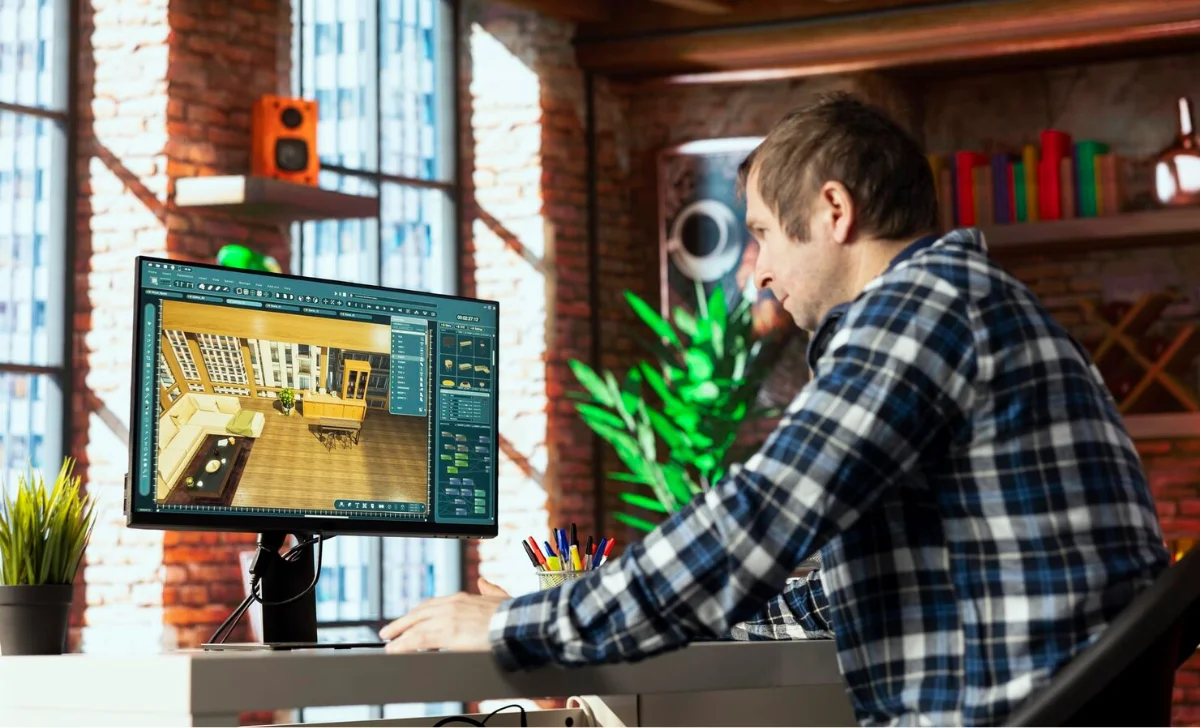
Starting a house upgrade can seem fun initially. You imagine a brighter living room, a more modern kitchen, a refreshed exterior, or a backyard that finally feels useful. But once the real decisions begin, the process can quickly become confusing.
Which materials should you choose?
Will the new color palette actually work?
How will the furniture look in the room?
Will the exterior still feel balanced after changing the façade?
Can a simple sketch really turn into a clear design direction?
For many homeowners, the hardest part of renovation is not knowing what they want. It is visualizing the final result before money, time, and effort are invested. This is where AI visualization is starting to change the way people approach home improvement, interior design, exterior upgrades, and early architectural planning.
Instead of relying only on imagination, mood boards, or rough sketches, homeowners and design professionals can now use AI-powered tools to turn ideas into realistic visuals. This makes the planning process clearer, faster, and easier to discuss.
Things You Will Learn About?
Inside this handbook, we’ll explore:
- Why visual planning matters in home improvement
- How AI helps homeowners understand design possibilities
- Where AI visualization fits into renovation projects
- How interior, exterior, landscape, and staging ideas can be tested
- How aids such as ArchiVinci are proving helpful for house owners, artists, builders, and property agents
- How to use AI visuals responsibly before starting a project
Why Home Improvement Projects Need Better Visual Planning?
A home improvement idea can sound perfect in your head but look completely different once it is applied to a real space.
A shade of paint might appear great on screen but seem too dim in your actual lounge. A modern sofa may not suit the proportions of the room. A new exterior material may clash with the roof. A garden concept may look attractive in theory but feel disconnected from the architecture of the home.
That’s why seeing things beforehand matters greatly.
Before making permanent decisions, homeowners need to see how design choices may work together. Good visualization helps answer questions like:
- Does the new design fit the existing structure?
- Do the materials feel balanced?
- Is the lighting warm enough?
- Does the room feel more spacious?
- Does the exterior have stronger curb appeal?
- Will the finished project match the original goal?
Traditional design visualization often requires professional rendering software, 3D modeling skills, or long back-and-forth revisions. That can be useful for large projects, but it may feel too slow or expensive during the early idea stage.
AI visualization offers a faster way to explore possibilities before moving deeper into the renovation process.
How AI Visualization Works In Simple Terms?
AI visualization uses artificial intelligence to transform an input into a more developed visual result. That input might be a photo of a room, an exterior image, a sketch, a floor plan, a 3D model screenshot, or even a written prompt.
The AI studies the structure, perspective, materials, and design direction. Then it generates a new version of the space based on the selected style or instruction.
For example, a homeowner could upload a photo of an empty living room and generate a fully furnished concept. An artist might add a simple drawing and transform it into a real-looking building picture.
An architect could upload a model screenshot and create a more polished visual for presentation. A property owner could test a new exterior façade before committing to construction work.
This does not mean AI replaces professionals. Instead, it helps people see ideas more clearly before final decisions are made.
Interior Design: Testing Rooms Before Buying Anything
Interior design is one of the easiest areas where AI visualization can make a difference.
Many homeowners struggle to choose furniture, colors, wall finishes, flooring, lighting, and décor because they cannot see everything together. A room is not made from one item. It is made from the relationship between many details.
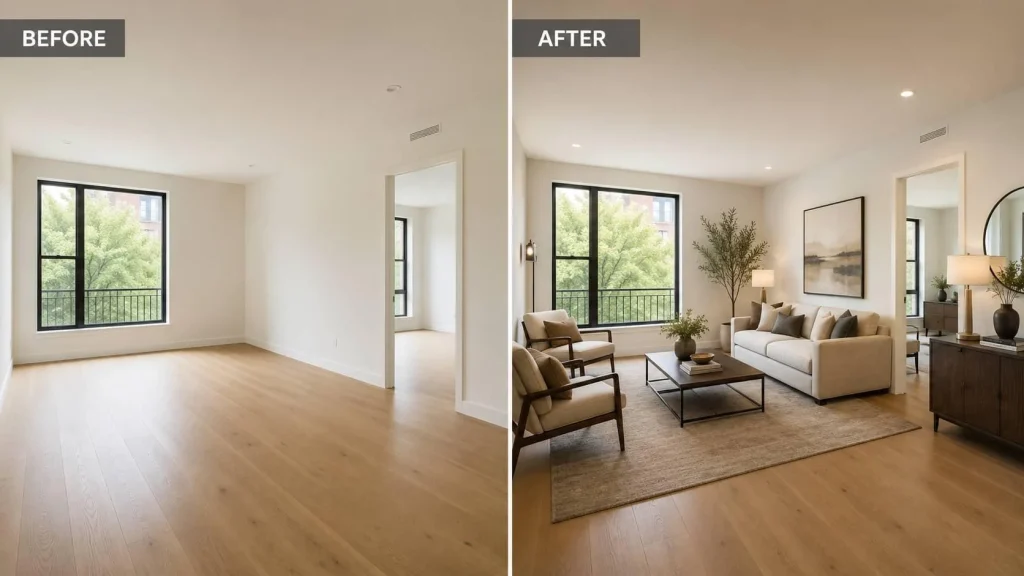
AI interior visualization can help test:
- Furniture layouts
- Wall colors
- Flooring options
- Lighting moods
- Décor styles
- Kitchen concepts
- Bathroom upgrades
- Bedroom themes
- Living room transformations
- Office and study areas
This is especially helpful when working with empty rooms. A vacant room can feel cold, small, or difficult to understand. With virtual furnishing, the same room can be shown as a warm family living area, a modern home office, a guest bedroom, or a luxury lounge.
Platforms such as ArchiVinci are designed to support these kinds of architectural and interior visualization workflows. Instead of starting from a blank canvas, users can upload an existing photo, sketch, plan, or model image and explore realistic design directions from there.
For homeowners, this means fewer blind decisions. For designers, it means faster communication. For real estate professionals, it means helping buyers understand how a space could look with the right styling.
Exterior Design: Improving Curb Appeal Before Renovation
The outside of a house gives the first look. Even tiny adjustments can change the whole feel of a place.
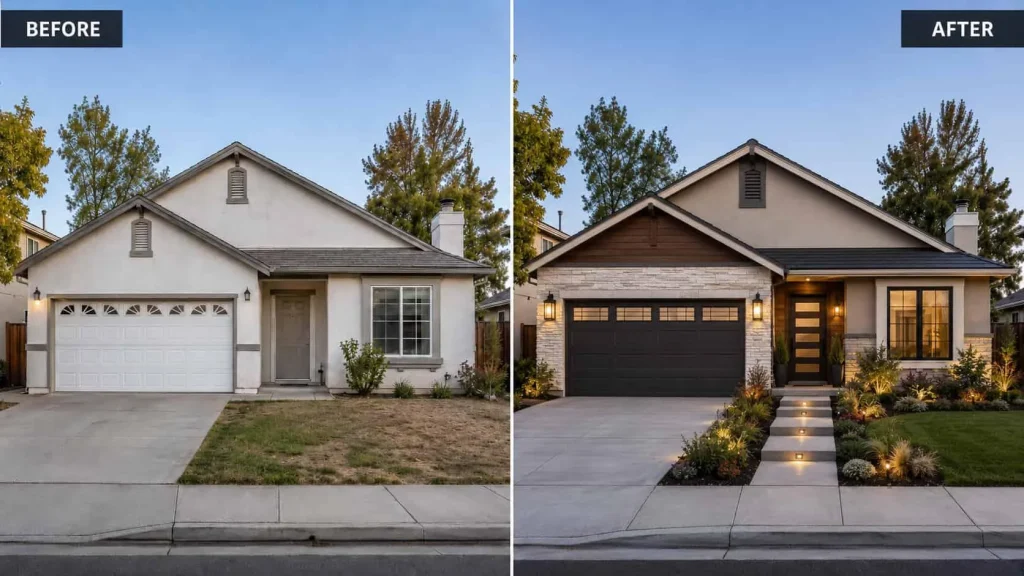
A refreshed façade, modern windows, better lighting, updated cladding, or improved landscaping can make an older home feel more valuable and inviting. But exterior changes can also be risky because they are often expensive and highly visible.
AI exterior visualization can help test ideas before starting work.
Homeowners can explore:
- New façade materials
- Modern exterior colors
- Roof and wall combinations
- Window and door updates
- Entryway improvements
- Outdoor lighting
- Terrace and patio ideas
- Front yard landscaping
- Garden upgrades
- Poolside or backyard concepts
This is useful because exterior design is about harmony. The walls, roof, windows, landscaping, lighting, and surrounding environment all need to work together.
With AI visualization, a homeowner can compare several directions before choosing one. For example, they may test a warm natural stone look, a clean white modern façade, or a darker contemporary style. Viewing these choices visually helps avoid expensive errors.
Sketches, Photos, Plans, And 3D Models Can Become Clear Visuals
One of the most useful parts of AI rendering is that it can work from different starting points.
Not every project begins with a professional 3D model. Often, you begin with a fast drawing. Other times, it’s a layout map. Sometimes it is a basic model screenshot from SketchUp or another design tool. Sometimes it is simply a photo of the existing space.
ArchiVinci is useful because it supports multiple architectural workflows, including:
- Photo to render
- Sketch to render
- Plan to render
- 3D model screenshot to render
- Interior rendering
- Exterior rendering
- Landscape visualization
- Masterplan visualization
- Virtual staging
- Render enhancement
- Image to video
This adaptability is key as various people have distinct requirements. A homeowner may only have a phone photo of a room. An interior designer may have a mood board and early layout. An architect may have a concept sketch or massing model. A developer may have a masterplan or site image.
A strong AI visualization tool should adapt to these inputs instead of forcing every user into the same workflow.
Exact Render: Keeping The Original Design Structure
One common problem with AI-generated design images is that they can change too much. A room may look beautiful, but the windows move. A building may look realistic, but the structure becomes different. A model may turn into a completely new design instead of improving the original idea.
For architecture and home improvement, this can be a serious issue. Accuracy matters.
This is why Exact Render-style workflows are valuable. The aim isn’t to fully remake the picture. The goal is to preserve the original layout, camera angle, structure, and composition while improving materials, lighting, realism, and visual quality.
This can help when:
- A designer wants to improve a rough render
- An architect wants to keep the same model angle
- A homeowner wants to see the same room with better finishes
- A real estate professional wants a believable concept
- A developer wants a clearer presentation without changing the design
The best AI visualization is not always the most dramatic. Sometimes the most useful result is the one that respects the original space while making it easier to understand.
Landscape And Outdoor Planning
House upgrades extend beyond just the building’s interior. Outdoor spaces are now an important part of how people experience their homes.
A garden, patio, terrace, outdoor kitchen, pool area, or front yard can completely change the feeling of a property. But outdoor planning can be difficult because plants, materials, lighting, furniture, and pathways all need to work together.
AI landscape visualization can help homeowners explore:
- Garden layouts
- Outdoor seating areas
- Pathways
- Pool surroundings
- Planting styles
- Lighting concepts
- Courtyard designs
- Backyard entertaining spaces
- Front yard curb appeal
This comes in handy particularly when a place has empty outside areas. Instead of guessing what could work, homeowners can see different versions before investing in landscaping, furniture, paving, or planting.
Masterplan Visualization For Larger Projects
For larger residential developments, community spaces, mixed-use areas, or planning presentations, masterplan visualization can also be helpful.
A black-and-white site plan may be clear to professionals, but it can be difficult for clients, investors, or homeowners to understand. AI masterplan coloring and visualization can turn a technical plan into a more readable image with roads, buildings, green areas, landscape zones, and surrounding context.
This can support:
- Early development presentations
- Real estate project marketing
- Urban planning discussions
- Community layout concepts
- Investor communication
- Architecture portfolio visuals
Clear visuals help people understand the scale and purpose of a project faster.
Image-To-Video: Making Design Presentations More Engaging
Static images are useful, but video can make a design feel more immersive. AI image-to-video tools can turn a still render into a short animated presentation with camera movement, depth, and atmosphere.
This can be useful for:
- Social media content
- Client presentations
- Architecture portfolios
- Real estate marketing
- Interior design previews
- Developer project showcases
Instead of showing only one image, professionals can create a more dynamic visual experience. A slow zoom into a living room, a gentle exterior camera movement, or a cinematic view of a landscape concept can make the design easier to feel and understand.
This is especially valuable in online marketing, where attention spans are short and strong visuals often perform better.
Why Does AI Visualization Support Better Decisions?
AI visualization helps because it reduces uncertainty.
A homeowner can compare ideas before buying materials. A designer can show multiple directions before spending hours on manual revisions. An architect can communicate design intent earlier. A real estate agent can help buyers imagine a property’s potential. A developer can explain a project more clearly.
The main benefits include:
- Faster concept exploration
- Clearer communication
- Better style comparison
- Reduced design confusion
- More confident decision-making
- Stronger presentations
- More realistic expectations
- Better visual storytelling
It also makes design more accessible. People who do not know professional rendering software can still explore visual ideas in a simple way.
Using AI Visuals Responsibly
AI visualization is powerful, but it should be used responsibly.
A generated image should not be treated as a construction document. It does not replace architectural drawings, building codes, structural advice, contractor estimates, or professional design review.
Before starting a renovation, homeowners should still speak with qualified professionals, especially when changes involve structure, plumbing, electrical work, permits, or safety.
AI images work best as idea-generating aids. They help people explore the look, feel, mood, and direction of a project. They are not a final technical plan.
Responsible use means:
- Being clear when an image is conceptual
- Not using AI to hide real property issues
- Checking dimensions and materials with professionals
- Keeping expectations realistic
- Using visuals as a planning aid, not a guarantee
- Making final decisions with expert advice
Used like this, AI can ease the planning steps without causing problems.
Choosing The Right AI Visualization Tool
Not every AI image tool is suitable for home improvement or architectural design. Some tools generate attractive images but ignore structure, scale, or layout. For architecture, those details matter.
When choosing an AI visualization platform, look for features such as:
- Interior and exterior support
- Ability to work from photos, sketches, plans, and 3D models
- Realistic lighting and material handling
- Options for preserving the original structure
- Virtual staging features
- Landscape and outdoor design tools
- High-quality render enhancement
- Easy browser-based workflow
- Tools designed specifically for architecture and design
A platform built around architecture will usually be more useful than a general image generator. The main point isn’t only to make a nice image. The aim is to make a visual aid that helps people grasp a true area or concept.
For this reason, AI architecture tools such as ArchiVinci can be helpful for homeowners, architects, interior designers, real estate agents, stagers, and developers who need fast, realistic, and practical visualization support.
Wrapping It All Up
Home improvement is easier when people can see the possibilities clearly.
Whether someone is redesigning a living room, refreshing an exterior, planning a garden, preparing a property for sale, or presenting an early architectural concept, AI visualization can make the process more understandable.
It helps turn uncertain ideas into visible options. It supports better conversations between homeowners and professionals. It allows different styles, materials, layouts, and design directions to be tested before major decisions are made.
Most importantly, AI visualization helps people move from imagination to clarity.
A better visual plan can lead to better design choices, fewer misunderstandings, and more confident renovation decisions. For homeowners and professionals alike, that makes AI an increasingly valuable part of the modern home improvement process.
